

In today’s market, it is challenging for organizations to find staff. This makes it even more important for employees to use their time efficiently. Copilot helps sales teams work more productively and effectively on daily tasks. It enables employees to gain insights with a single question, without extensive searching and clicking.
Quick Access to All Information
With CRM, all customer-related information is centrally stored and accessible to everyone in the organization. However, it’s crucial that this information appears on your screen as quickly as possible.
An account may have multiple opportunities or leads associated with it, and you want instant insights into all the information surrounding that account. Imagine getting a quick overview of everything pending with the customer, without having to click through the system. Copilot provides solutions for this; it can generate a summary of all account-related information. This gives you an immediate overview of the customer. Think of general details, such as how long they have been a customer, when the last successful opportunity occurred, and the KPIs set for this account. This saves time and allows you to focus on other tasks.
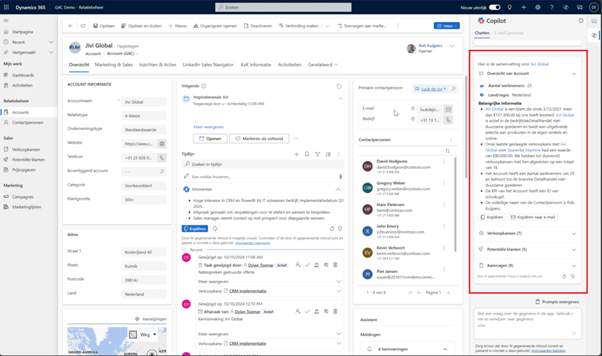
Information from all documentation related to the customer
If you’re already using SharePoint within Dynamics 365 Sales, Copilot helps you retrieve information even more efficiently. Not using the Office integration yet or want to learn more about the possibilities? Check out this blog: Microsoft CRM and Office 365.
For effective relationship management, it’s essential to always have the most up-to-date information at your fingertips. With Copilot, you can easily request all related documentation for an account. Combined with the account summary, you gain immediate access to all relevant information. This allows you to instantly see which quote was sent last and what was outlined in the contract proposal. Stay one step ahead of the competition by knowing exactly what has happened with the customer. With Copilot, you save time that would otherwise be spent searching for documentation.
Moreover, it’s not just about knowing which documentation is linked to an opportunity, but also understanding the content within it. Copilot searches through these documents and expands its queries. It looks for information not only within CRM but also in relevant documentation linked to, for example, an opportunity.
Stay informed about news related to your accounts
Copilot provides you with the latest news about your accounts via Bing. It ensures that only relevant news articles are displayed, so you don’t miss anything important. This way, you can further enhance your 360-degree customer view, which can lead to healthier customer relationships!
Stay updated on all changes to leads, opportunities, and accounts
In the dynamic world of sales, it’s essential to respond quickly to changes. Adjustments need to be implemented swiftly and made immediately visible.
Employees want to stay informed about updates to opportunities, leads, and accounts at all times. By asking Copilot for recent updates, you instantly receive an overview of changes and the associated records. This saves you significant time that would otherwise be spent requesting information from colleagues, searching through email conversations, or navigating the CRM system.
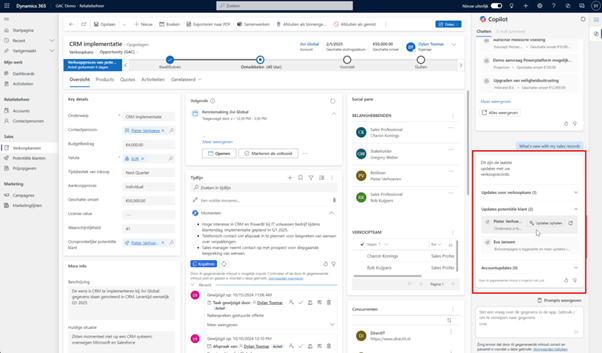
Minimal effort, maximum preparation for meetings
A schedule packed with meetings can make preparation time-consuming and inefficient. Let Copilot support you, so you spend as little time as possible searching for information and getting ready.
By asking Copilot to assist with preparation for upcoming meetings, you’ll receive key insights to leverage. This includes topics that need to be discussed or outstanding opportunities not on the agenda but worth addressing. Copilot provides an overview of relevant subjects related to the meeting’s title, ensuring you’re always well-prepared with minimal effort.
Email Assistant
Nowadays, much communication takes place via email, making it challenging for employees to stay organized.
Copilot helps keep your emails organized and makes the process more efficient in every sense. It not only assists in drafting emails but also provides summaries of email conversations and an overview of all unanswered emails within the CRM.
Drafting a concept Email
Every day, countless emails are sent within an organization, making email drafting sometimes feel like a distracting or monotonous task.
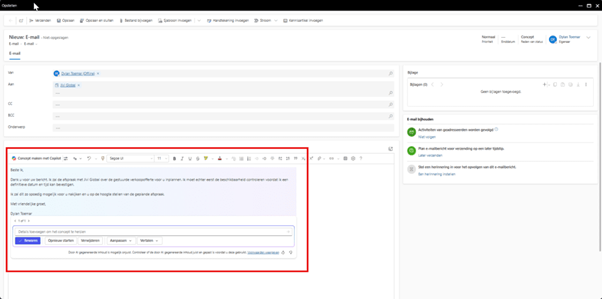
Copilot streamlines this process by providing a draft for your email, which you can always customize. Simply specify the subject, the desired tone (formal, friendly, or professional), and the preferred length. With Copilot, all that’s left for you to do is review and refine the draft. This requires less effort and is far more time-efficient!
Summary of Email correspondence
When there has been extensive contact with a customer involving multiple people, it can be challenging to pinpoint the key points of the email conversation.
Copilot can assist by providing a summary of the conversation. If the email exchange is tracked in Microsoft 365 Sales, Copilot can generate a concise overview of all relevant topics discussed. This way, you don’t have to read through every email to understand the essence of the conversation!
Which Emails do I still need to respond to?
With frequent email communication involving multiple contacts or accounts, it’s easy to overlook or forget certain emails. Copilot provides a complete overview of all unanswered emails, including those from leads or opportunities.
Copilot analyzes the content of the emails to identify buying intent, questions, or call-to-actions, while also prioritizing them based on urgency. This allows you to effectively prioritize which emails need a response and ensures you have a clear overview of any unanswered or forgotten emails by the end of the day.
In short, AI assistance is indispensable today. Failing to adopt this technology puts you at risk of falling behind. Embrace this tool to get the most out of your workday!

