One setting makes the difference between an ‘old-fashioned’ chat bot and a modern autonomous agent. The answer to the question “How should your copilot interact with people?” is crucial.

Copilot Studio is based on the Power Virtual Agent, the old name of Copilot Studio. With Power Virtual Agent, companies were able to create chat bots that they could place on their company website, among other things. These chat bots then communicated with website visitors and could provide customers with answers to predefined questions. This last point is important because old-fashioned chat bots follow a pre-orchestrated communication path. The user of the chat bot was part of a question & answer ‘game’ that was entirely set up by the creator of the chat bot. The communication paths that could be followed were all clear in advance.
With one simple setting in Copilot Studio, you can completely change the behavior of an autonomous agent. The setting is somewhat hidden, but you can find it through the general settings.
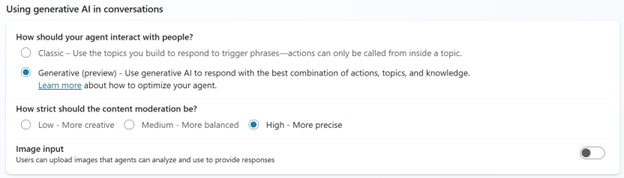
The question “How should your copilot interact with people?” is asked. If you leave it on ‘Classic’, you create an ‘old-fashioned’ chat bot as described above. If you set the setting to ‘Generative’, you create a truly autonomous agent. Such an agent is currently turning the world upside down. The setting is still in preview at the time of writing and is only available in English.
The Generative AI setting in Copilot Studio allows you to orchestrate agent behaviour in a way that feels much more natural and fluid for users. Instead of only responding to predefined trigger phrases, an agent with generative AI can choose the best actions, knowledge, and topics to answer user questions or respond to event triggers. In other words, you give the autonomous agent the knowledge, topics, and actions and let it decide when to use them in the conversation with the user. You give the agent a lot of freedom in its actions. I talk about an agent in the masculine form, but this can of course also be feminine.
The combination of knowledge, topics, actions, and the freedom to act make an agent autonomous. Knowledge forms the basis of an agent’s ability to provide relevant and accurate answers to a wide range of user questions. An autonomous agent needs knowledge to function effectively and offer valuable interactions to users. Without an extensive knowledge base, an agent would be limited in its responses and could only provide predefined answers. Then the agent would actually be an ‘old-fashioned’ chat bot. By having access to extensive and up-to-date knowledge sources, the agent can dynamically respond to new and unexpected questions. Possible knowledge sources for an agent are public websites, text-based files (Word or PDF), and Dataverse tables (your entire CRM system). But with the many connectors, you can make knowledge available to the agent in all possible systems.
Topics play a crucial role in the functioning of an autonomous agent. They actually have nothing to do with AI but are defined and orchestrated mini-correspondence flows. They help the agent quickly and effectively retrieve information from the user, respond to it, and take action. Topics act as a compass that guides the agent to the core of user questions, enabling it to provide more valuable and contextually appropriate answers.
Actions are specific tasks or operations that an agent performs in response to user input or event triggers. These actions can range from sending an email, updating an Excel sheet, creating a lead in your CRM system, or calling a Power Automate cloud flow. In Copilot Studio, actions can be defined and configured to work seamlessly with the agent’s knowledge and topics. This allows the agent not only to provide relevant information but also to perform practical actions that are directly useful to the user. These automated actions contribute to creating a more efficient and responsive experience for users.
To make generative AI work optimally, descriptions are very important. Both knowledge, topics, and actions have a description. Write these carefully because, based on the description, the autonomous agent chooses which knowledge, topic, or action to use in the conversation. Regularly evaluate the agent to see if it works as expected. If the agent does not do exactly what you expect, adjust the descriptions or make changes to the knowledge sources, topics, or actions. Keep fine-tuning your autonomous agent!
While generative AI offers many benefits, there are also some limitations to consider. As with any AI-driven technology, the generated answers may sometimes not be entirely perfect. Not all languages are supported at the time of writing. For example, the generative option is currently only available in English.

 S04 – E08 – Approval cloud flows